VertexDSP Header


MultiInspector

[Download...] [Buy...]


Key Features

  • Multitrack Spectrum Analysis
  • FFT and 31 Band Third Octave
  • Independent Editor Windows
 

User Comments

"I love this plug-in... Totally worth every penny."

"It's such a great idea. Plug-in of the year!"

[Read more comments...]


Description

Based on the technology of FaderWorks to handle multiple dependent instances of the same plug-in, MultiInspector extends the usage of spectrum analyzers especially in multitrack environments by providing an easy way for simultaneous spectral analysis of several audio signals.

The first instance of MultiInspector behaves like a standard spectral analyzer. Additional instances automatically send their spectral analysis result to all other instances of MultiInspector. By default, every editor window of MultiInspector shows the same content, but there are numerous options for customizing the display content so that different views of the audio signals can be achieved. After opening all necessary plug-in instances it is sufficient to leave just the editor windows open you really need.

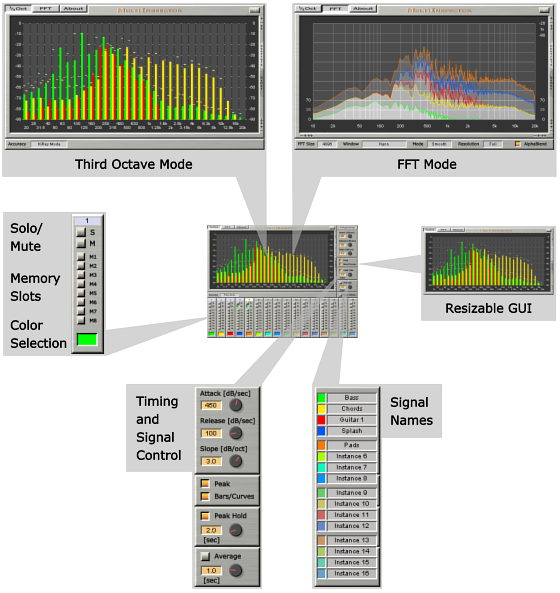
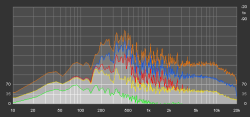
MultiInspector provides an FFT mode for spectral analysis with several options for FFT size and window selection. There are different viewing modes for overlapping and stacked display.

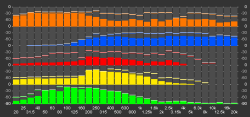
In addition to the FFT mode, MultiInspector incorporates a standard third octave frequency analyzer. The center frequencies of the bands are based on the ISO 266:1997 standard (20 Hz to 20 kHz). Pink noise will appear flat in the frequency spectrum with the default slope setting of 3 dB per octave. MultiInspector contains a switchable high resolution mode for low frequency bands. Depending on the viewing mode the width and height of the level bars are adjusted according to the current number of signals that are selected for display.

Besides the multi-instance functionality, you can still use MultiInspector as a "normal" spectrum analyzer by just pressing the solo button of the current instance.

MultiInspector supports up to 16 instances at any sample rate from 32 kHz up to 192 kHz.


Display Modes

There are 3 different display modes for alignment/spacing of the spectral result available.

H-Align/Overlay: The width of the level bars is automatically adjusted according to the number of signals currently viewed (third octave mode). All signals overlap with semi-transparent regions (FFT mode).


V-Align: The spectral data is aligned vertically without space. This mode provides an instant overview of the frequency distribution of all instances.


V-Space: The spectrum of every instance is displayed in an own view. These views are ordered vertically.


Options

 
In third octave mode there is a high resolution mode for the low frequency bands and an economy mode for reducing the CPU load. This mode selection is shared across all instances.


In FFT mode you can select FFT sizes from 512 to 16384 samples. Several window options are available (Rectangular, Hann, Hamming, Blackman, Blackman-Harris, Flat Top). These selections are shared across all instances.
For every editor window you can choose between instant display of the FFT result or smooth display according to the Attack and Release settings.
To smooth the peaks in full FFT resolution the Resolution menu allows the display of octaves and fractions of octaves. Together with the AlphaBlend switch for a semi-transparent display of the curves this improves the detection of overlapping frequency ranges.

The following settings are unique to the editor window of every instance and are also part of the presets. This enables the creation of different views for the analysis content.

Select one of the 3 display modes mentioned above with a drop-down menu.

For smooth operation, the attack and release time of the level bars can be adjusted from 1 to 800 dB per second.

The default slope of 3 dB per octave leads to a flat display of pink noise (third octave mode). The slope value can be changed from -10.0 to +10.0 dB per octave. There is an additional default value of 0 dB for the FFT mode.

The display of peak values and of the level bars/FFT curves can be turned on and off. It is also possible to enable peak hold with a hold time from 0.1 to 20.0 seconds.

The average mode allows a time range from 0.1 to 5.0 seconds.

Sync Others forces all other instances to switch to the same mode (third octave or FFT) as the current instance. This is useful for reducing the CPU load if only one mode is needed.

For quick selection of the signals to display, MultiInspector incorporates solo/mute switches for the analysis result from every instance. The level bars and FFT curves automatically adjust to the current number of signals selected for display.

There are 8 memory slots for every signal which add up to 8 x 16 memory slots (for all instances) per editor window.

MultiInspector lets you customize the color of every signal.


Feature List

  • FFT and 31 band third octave frequency analyzer showing the spectral analysis of other plug-in instances in the same window.
  • Independent editor windows for different views of the same content.
  • Name panel: Every signal can be given a name to clarify the instance's usage in a mix setup.
  • Different viewing modes for horizontal and vertical alignment/spacing.
  • FFT sizes from 512 to 16384 samples.
  • FFT window options: Rectangular, Hann, Hamming, Blackman, Blackman-Harris, Flat Top.
  • Switchable semi-transparent display of the FFT curves for easy detection of overlapping frequency ranges.
  • Resolution options for FFT mode: Full, Fractions of octaves (1, 1/2, 1/3, ..., 1/9, 2/3, 3/4).
  • Level bar display automatically adapts to the number of signals currently viewed.
  • Measurement cursor for frequency and level.
  • Adjustable color for every signal.
  • Adjustable attack and release time for smooth level bar display.
  • Adjustable slope with a default of 3 dB per octave for flat display of pink noise (third octave mode)
  • Peak option and peak hold mode.
  • Average mode.
  • Solo/mute for signal selection.
  • 8 memory slots per signal in every editor window (8 x 16 memory slots per window).
  • Pause button.
  • Up to 16 instances.
  • VST 2.4 compatible.
  • Sample rates from 32 kHz up to 192 kHz.

MultiInspector is available as a plug-in for Windows (VST only) and Mac OS X (VST and AU, both Universal Binary).


Screenshots


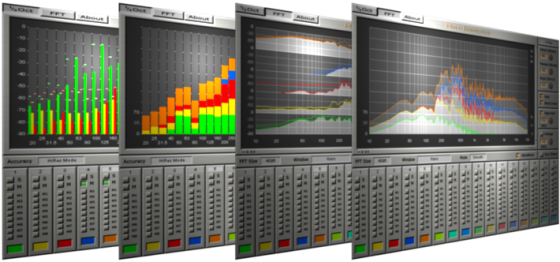
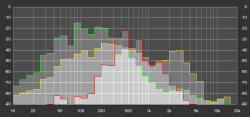
Click on one of the screenshots to open the image in full size. The screenshots show different parameter settings for displaying the analysis results of the audio signals.


System Requirements

Windows:

  • Windows 2000/XP/Vista.
  • VST compatible host software.

Mac OS X:

  • Mac OS X 10.3.9/10.4/10.5.
  • VST or AU compatible host software.


Download MultiInspector

MultiInspector has been released for Windows and Mac OS X. [Download...]


History

Version 2.2.0 - 05-Mar-2008
Enhancements
• The controls area on the right side can now be switched to a name panel for all signals.
• The memory switches can be used in combination with the alt-key to access a complete row.
• Pause button added.
• Additional zoom buttons for setting the level range.
• The maximum peak hold time has been increased from 5 sec to 20 sec.
• Measurement of frequency and level by clicking into the frequency display area.

Version 2.1.1 - 14-Jan-2008
Enhancements
• Instance numbers are now shown in different colors, depending on their state and usage.
Bug Fixes
• FFT mode does now display without requiring audio to be routed through all instances.
• Sometimes the plug-in window did not get the focus with the first mouse click (Windows only).

Version 2.1.0 - 14-Sep-2007
Enhancements
• New Resolution Option for FFT mode: Full, Fractions of octaves (1, 1/2, 1/3, ..., 1/9, 2/3, 3/4).
Manual included.
Bug Fixes
• Minor bug fixes.

Version 2.0.0 - 29-Aug-2007
Enhancements
• New FFT Mode for the spectrum display with several options for FFT size and window.
• New button Sync Others: Switch all other instances to the same mode (1/3 oct or FFT).
• The Slope knob now has an additional default value of zero.
Bug Fixes
• Negative slope values caused the display of a constant level in 1/3 oct mode.
• Keyboard focus of the host is now retained after clicking inside the editor window (Mac only).
• Compatibility issues with systems running Mac OS X 10.3.

Version 1.2.1 - 11-Jun-2007
Enhancements
• The levels of the spectrum display are now scalable in steps of 10 dB.
• New display modes added: H-Align, V-Align and V-Space.
• The default color set has been changed for better contrast.
• The timeout of the demo version has been increased from 10 to 60 minutes.

Version 1.1.3 - 23-May-2007
Enhancements
• Performance improvements.
• Switching via solo/mute now displays the levels immediately (ignoring the Attack setting).
Bug Fixes
• Incorrect assignments of levels in low frequency bands if HiRes Mode is deactivated.

Version 1.1.0 - 16-May-2007
Enhancements
• New high resolution mode (HiRes Mode) for the low frequency bands.
Bug Fixes
• Incorrect drawing of the GUI after loading a preset under certain circumstances.

Version 1.0.0 - 07-May-2007
• Initial Release.

You can find the latest release notes here.


Copyright © 2008 VertexDSP, all rights reserved - Imprint - Developer Blog